AUTHENTICATION
SERVICE
USING JWT

Today, i will create authentication service. In my career as software developer, I never had a chance handle authentication service, so I think I need to learn to authenticating user. Every first step always start from the simple one.
JWT (json web token) is a proposed Internet standard for creating data with optional signature, optional encryption whose payload hold JSON that assert some number of claims. The tokens are signed either using a private secret or a public secret.
Prerequired
- check_circle Intention (must have)
- check_circle Spring boot 3.3.3
- check_circle Intelij Idea (My darling IDE)
- check_circle Java 17
- check_circle Maven
- check_circle Postman
Support System
- check_circle Girlfriend (not found)
- check_circle Cassave chips
- check_circle A bottle of water
Setup Project
Go to Spring Initialzr Spring Initializr then create new project.
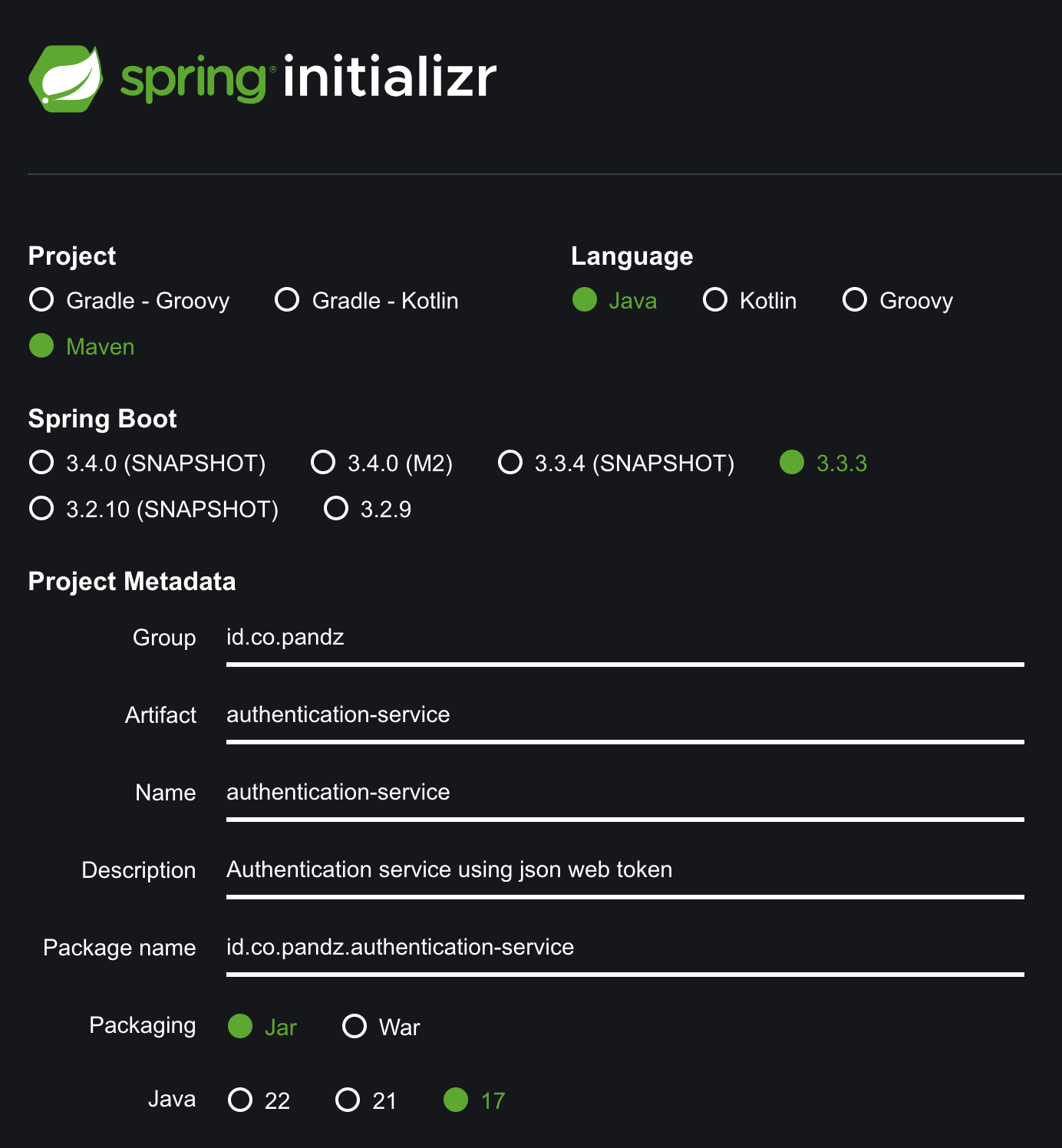
Dependencies.
Add dependencies such as: json-web-token, spring-security, apache-codec, data-jpa, postgresql.
<dependency>
        <groupId>org.springframework.boot</groupId<
        <artifactId>spring-boot-starter-data-jpa</artifactId<
        <optional>true</optional<
    </dependency<

    <dependency>
        <groupId>org.postgresql</groupId<
        <artifactId>postgresql</artifactId<
        <scope>runtime</scope<
    </dependency<


    <dependency>
        <groupId>io.jsonwebtoken</groupId<
        <artifactId>jjwt-api</artifactId<
        <version>0.12.6</version<
    </dependency<


    <dependency>
        <groupId<io.jsonwebtoken</groupId<
        <artifactId<jjwt-impl</artifactId<
        <version<0.12.6</version<
        <scope<runtime</scope<
    </dependency<


    <dependency>
        <groupId>io.jsonwebtoken</groupId>
        <artifactId>jjwt-jackson</artifactId>
        <version>0.12.6</version>
        <scope>runtime</scope>
    </dependency>


    <dependency>
        <groupId>org.springframework.security</groupId>
        <artifactId>spring-security-core</artifactId>
        <version>6.3.3</version>
    </dependency>


    <dependency>
        <groupId>org.springframework.security</groupId>
        <artifactId>spring-security-web</artifactId>
        <version>6.3.3</version>
    </dependency>


    <dependency>
        <groupId>org.springframework.security</groupId>
        <artifactId>spring-security-config</artifactId>
        <version>6.3.3</version>
    </dependency>


    <dependency>
        <groupId>org.springframework.security</groupId>
        <artifactId>spring-security-crypto</artifactId>
        <version>6.3.3</version>
    </dependency>


    <dependency>
        <groupId>commons-codec</groupId>
        <artifactId>commons-codec</artifactId>
        <version>1.17.1</version>
    </dependency>
I'm using postgresql database, you can use any database you want. No pressure here wkk :v
Configure Properties
Set profile active in application.properties.
spring.profiles.active=devCreate new file application-dev.properties inside resources folder.
spring.application.name=authentication-service

server.servlet.context-path=/authentication
server.port=8005

# DB CREDENTIAL
db.host=localhost
db.port=55000
db.name=postgres

spring.datasource.url=jdbc:postgresql://${db.host}:${db.port}/${db.name}
spring.datasource.username=postgres
spring.datasource.password=postgrespw
spring.datasource.driverClassName=org.postgresql.Driver

# Hibernate properties
spring.jpa.show-sql=false
spring.jpa.properties.hibernate.dialect=org.hibernate.dialect.PostgreSQLDialect
spring.jpa.hibernate.ddl-auto=none
spring.jpa.properties.hibernate.jdbc.lob.non_contextual_creation=true

# JWT
jwt.secret-key=mulyonosecretservice9a4f2c8d3b7a1e6f45c8a0b3f267d8b1d4e6f3c8a9d2b5f8e3a9c8b5f6v8a3d9
# 1h in millisecond
jwt.expiration-time=3600000
Structure Project
Create structure package below.
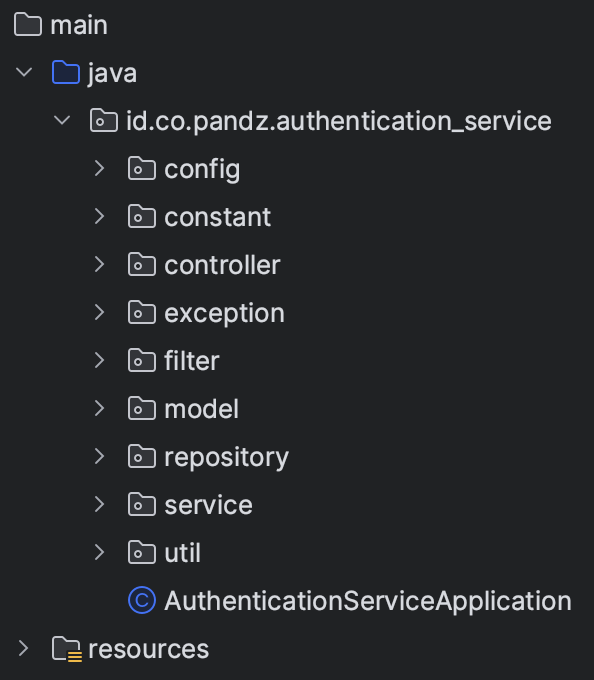
Create java class UserDao at /model/db/.
@Setter
@Getter
@Entity
@Builder
@AllArgsConstructor
@NoArgsConstructor
@Table(name = "user", schema = "authentication")
public class UserDao implements UserDetails {
  @Id
  @GeneratedValue(strategy = GenerationType.IDENTITY)
  private Long id;

  @Column(name = "fullname", nullable = false)
  private String fullname;

  @Column(name = "email", unique = true, length = 100, nullable = false)
  private String email;

  @Column(name = "password", nullable = false)
  private String password;

  @JsonFormat(shape = JsonFormat.Shape.STRING, pattern = "yyyy-MM-dd'T'HH:mm:ss")
  @JsonDeserialize(using = LocalDateTimeDeserializer.class)
  @JsonSerialize(using = LocalDateTimeSerializer.class)
  @Column(name = "created_date")
  private LocalDateTime createdDate;

  @JsonFormat(shape = JsonFormat.Shape.STRING, pattern = "yyyy-MM-dd'T'HH:mm:ss")
  @JsonDeserialize(using = LocalDateTimeDeserializer.class)
  @JsonSerialize(using = LocalDateTimeSerializer.class)
  @Column(name = "updated_date")
  private LocalDateTime updatedDate;

  @Override
  public Collection<? extends GrantedAuthority> getAuthorities() {
    return List.of();
  }

  @Override
  public String getUsername() {
    return email;
  }

  @Override
  public String getPassword() {
    return password;
  }

  @Override
  public boolean isAccountNonExpired() {
    return true;
  }

  @Override
  public boolean isAccountNonLocked() {
    return true;
  }

  @Override
  public boolean isCredentialsNonExpired() {
    return true;
  }

  @Override
  public boolean isEnabled() {
    return true;
  }
}Note: we return email when getUsername because we set email to unique.
Make sure isAccountNonExpired, isAccountNonLocked, isCredentialsNonExpired, when isEnabled return true or authentication will fail.
Then create interface UserRepository inside repository folder.
public interface UserRepository extends JpaRepository<UserDao, Long> {
  UserDao findByEmail(String email);
}
We need to write service to handle process token: generate token, verify token, get username from token.
Create java class JwtHelper at /service/helper/ folder.
@Slf4j
@Service
@RequiredArgsConstructor
public class JwtHelper {
  @Value("${jwt.secret-key}")
  private String secretKey;

  @Value("${jwt.expiration-time}")
  private long jwtExpiration;

  public String extractUsername(String token) {
    return extractClaim(token, Claims::getSubject);
  }

  public <T> T extractClaim(String token, Function<Claims, T> claimsResolver) {
    final Claims claims = extractAllClaims(token);
    return claimsResolver.apply(claims);
  }

  public String generateToken(UserDetails userDetails) {
    return generateToken(new HashMap<>(), userDetails);
  }

  public String generateToken(Map<String, Object> extraClaims, UserDetails userDetails) {
    return buildToken(extraClaims, userDetails, jwtExpiration);
  }

  private Claims extractAllClaims(String token) {
    return Jwts
      .parser()
      .verifyWith((SecretKey) getSignInKey())
      .build()
      .parseSignedClaims(token)
      .getPayload();
  }

  public long getExpirationTime() {
    return jwtExpiration;
  }

  public boolean isTokenValid(String token, UserDetails userDetails) {
    final String username = extractUsername(token);
    return (username.equals(userDetails.getUsername())) && !isTokenExpired(token);
  }

  private boolean isTokenExpired(String token) {
    return extractExpiration(token).before(new Date());
  }

  private Date extractExpiration(String token) {
    return extractClaim(token, Claims::getExpiration);
  }

  private Key getSignInKey() {
    byte[] keyBytes = Decoders.BASE64.decode(secretKey);
    return Keys.hmacShaKeyFor(keyBytes);
  }

  private String buildToken(Map<String, Object> extraClaims, UserDetails userDetails, long expiration) {
      return Jwts
        .builder()
        .claims(extraClaims)
        .subject(userDetails.getUsername())
        .issuedAt(new Date(System.currentTimeMillis()))
        .expiration(new Date(System.currentTimeMillis() + expiration))
        .signWith(getSignInKey())
        .compact();
  }

  // Check if the token is valid and not expired
  public boolean validateToken(String token) {
    try {
      Jwts.parser().verifyWith((SecretKey) getSignInKey()).build()
        .parseSignedClaims(token)
        .getPayload();
      return true;
    } catch (MalformedJwtException ex) {
      log.error("Invalid JWT token");
    } catch (ExpiredJwtException ex) {
      log.error("Expired JWT token");
    } catch (UnsupportedJwtException ex) {
      log.error("Unsupported JWT token");
    } catch (IllegalArgumentException ex) {
      log.error("JWT claims string is empty");
    } catch (SignatureException e) {
      log.error("there is an error with the signature of you token ");
    }
    return false;
  }
}
Endpoint
We will build API that need authentication and some accessable without authentication.
Create service handle login and register AuthenticationService inside /service/usecase/ folder.
@Slf4j
@Service
@RequiredArgsConstructor
public class AuthenticationService {
  private final UserRepository userRepository;
  private final PasswordEncoder passwordEncoder;
  private final AuthenticationManager authenticationManager;
  private final JwtHelper jwtHelper;

  public ResponseEntity<ApiBaseResponse<RegisterRes>> signup(RegisterReq input, HttpServletRequest servletRequest) {
    log.info("Start register...");
    RegisterRes response;
    try {
      // Decode password
      String rawPassword = Base64Util.decode(input.getPassword());
      log.debug("Raw password: " + rawPassword);

      UserDao user = UserDao.builder()
        .fullname(input.getFullName())
        .email(input.getEmail())
        .password(passwordEncoder.encode(rawPassword))
        .createdDate(LocalDateTime.now())
        .build();

      UserDao userDao = userRepository.save(user);
      response = RegisterRes.builder()
        .fullname(userDao.getFullname())
        .email(userDao.getEmail())
        .build();
    } catch (Exception e) {
      log.error("Error when register: " + e.getMessage());
      throw new AuthenticationException(ERROR_MESSAGE_FAILED, ERROR_CODE_SYSTEM_ERROR, ERROR_DESCRIPTION_SYSTEM_ERROR);
    }
    return ResponseUtil.buildHttpResponse(ResponseUtil.buildResponse(ERROR_CODE_SUCCESS, ERROR_MESSAGE_SUCCESS, response));
  }

  public ResponseEntity<ApiBaseResponse<LoginRes>> login(LoginReq input, HttpServletRequest servletRequest) {
    log.info("Start login...");
    LoginRes response;
    try {
      // Decode password
      String rawPassword = Base64Util.decode(input.getPassword());
      log.debug("Raw password: " + rawPassword);

      Authentication authentication = authenticationManager.authenticate(new UsernamePasswordAuthenticationToken(input.getEmail(), rawPassword));

      log.info("User: {}, isAuthenticated: {}", authentication.getName() , authentication.isAuthenticated());

      UserDao userDao = userRepository.findByEmail(input.getEmail());

      String token = jwtHelper.generateToken(userDao);
      long expirationToken = jwtHelper.getExpirationTime();

      response = LoginRes.builder()
        .fullName(userDao.getFullname())
        .token(token)
        .expiredIn(expirationToken)
        .build();
    } catch (ExpiredJwtException e) {
      log.error("Error when login: " + e.getMessage());
      throw new AuthenticationException(ERROR_MESSAGE_FAILED, ERROR_CODE_DECLINE, ERROR_DESCRIPTION_TOKEN_EXPIRED);
    } catch (Exception e) {
      log.error("Error when login: " + e.getMessage());
      throw new AuthenticationException(ERROR_MESSAGE_FAILED, ERROR_CODE_SYSTEM_ERROR, ERROR_DESCRIPTION_SYSTEM_ERROR);
    }
    return ResponseUtil.buildHttpResponse(ResponseUtil.buildResponse(ERROR_CODE_SUCCESS, ERROR_MESSAGE_SUCCESS, response));
  }
}
We expect that input password from frontend are encoded, so the password not expose outside.
Then we need to create service user to get current user logged in. This API will be protected, so we need to retreive token to access it.
@Slf4j
@Service
@RequiredArgsConstructor
public class UserService {
  public ResponseEntity<ApiBaseResponse<UserProfileRes>> getUserProfile(HttpServletRequest servletRequest) {
    log.info("Start get user profile...");
    UserProfileRes response;
    try {
      Authentication authentication = SecurityContextHolder.getContext().getAuthentication();

      UserDao currentUser = (UserDao) authentication.getPrincipal();
      response = UserProfileRes.builder()
        .fullname(currentUser.getFullname())
        .email(currentUser.getEmail())
        .build();
    } catch (Exception e) {
      log.error("Error when get user profile: " + e.getMessage());
      throw new AuthenticationException(ERROR_MESSAGE_FAILED, ERROR_CODE_SYSTEM_ERROR, ERROR_DESCRIPTION_SYSTEM_ERROR);
    }
    return ResponseUtil.buildHttpResponse(ResponseUtil.buildResponse(ERROR_CODE_SUCCESS, ERROR_MESSAGE_SUCCESS, response));
  }
}
Let's create controller.
Create public controller AuthenticationController inside /controller folder.
@RestController
@RequiredArgsConstructor
@RequestMapping("auth")
public class AuthenticationController {
  private final AuthenticationService authenticationService;

  @PostMapping("login")
  public ResponseEntity<ApiBaseResponse<LoginRes>> login(@RequestBody LoginReq request, HttpServletRequest servletRequest) {
    return authenticationService.login(request, servletRequest);
  }

  @PostMapping("sign-up")
  public ResponseEntity<ApiBaseResponse<RegisterRes>> register(@RequestBody RegisterReq request, HttpServletRequest servletRequest) {
    return authenticationService.signup(request, servletRequest);
  }
}
Create private one UserController.
@RestController
@RequiredArgsConstructor
@RequestMapping("user")
public class UserController {
  private final UserService userService;

  @GetMapping("/me")
  public ResponseEntity<ApiBaseResponse<UserProfileRes>> authenticatedUser(HttpServletRequest servletRequest) {
    return userService.getUserProfile(servletRequest);
  }
}
Security Config
We will override basic authentication, add config below AuthConfig in /config folder.
@Configuration
@RequiredArgsConstructor
public class AuthConfig {
  private final UserRepository userRepository;

  @Bean
  UserDetailsService userDetailsService() {
    return userRepository::findByEmail;
  }

  @Bean
  BCryptPasswordEncoder passwordEncoder() {
    return new BCryptPasswordEncoder();
  }

  @Bean
  public AuthenticationManager authenticationManager(AuthenticationConfiguration config) throws Exception {
    return config.getAuthenticationManager();
  }

  @Bean
  public AuthenticationProvider authenticationProvider() {
    DaoAuthenticationProvider authProvider = new DaoAuthenticationProvider();

    authProvider.setUserDetailsService(userDetailsService());
    authProvider.setPasswordEncoder(passwordEncoder());

    return authProvider;
  }
}
Authentication Middleware
We want to retreive token from request header. Then check if token invalid or valid.
Create AuthenticationFilter in /filter folder.
@Slf4j
@Component
@RequiredArgsConstructor
public class AuthenticationFilter extends OncePerRequestFilter {
  private final UserDetailsService userDetailsService;
  private final JwtHelper jwtHelper;

  @Override
  protected void doFilterInternal(@NonNull HttpServletRequest request, @NonNull HttpServletResponse response, @NonNull FilterChain filterChain) throws ServletException, IOException {
    log.info("Check authentication...");

    String bearerToken = request.getHeader("Authorization");
    String token = null;
    if (StringUtils.hasText(bearerToken) && bearerToken.startsWith("Bearer ")) {
      token = bearerToken.substring(7);
    }

    if (token != null && jwtHelper.validateToken(token)) {
      UserDetails userDetails = userDetailsService.loadUserByUsername(jwtHelper.extractUsername(token));

      UsernamePasswordAuthenticationToken authentication
        = new UsernamePasswordAuthenticationToken(userDetails, null, userDetails.getAuthorities());

      authentication.setDetails(new WebAuthenticationDetailsSource().buildDetails(request));
      SecurityContextHolder.getContext().setAuthentication(authentication);
    }
    filterChain.doFilter(request, response);
  }
}
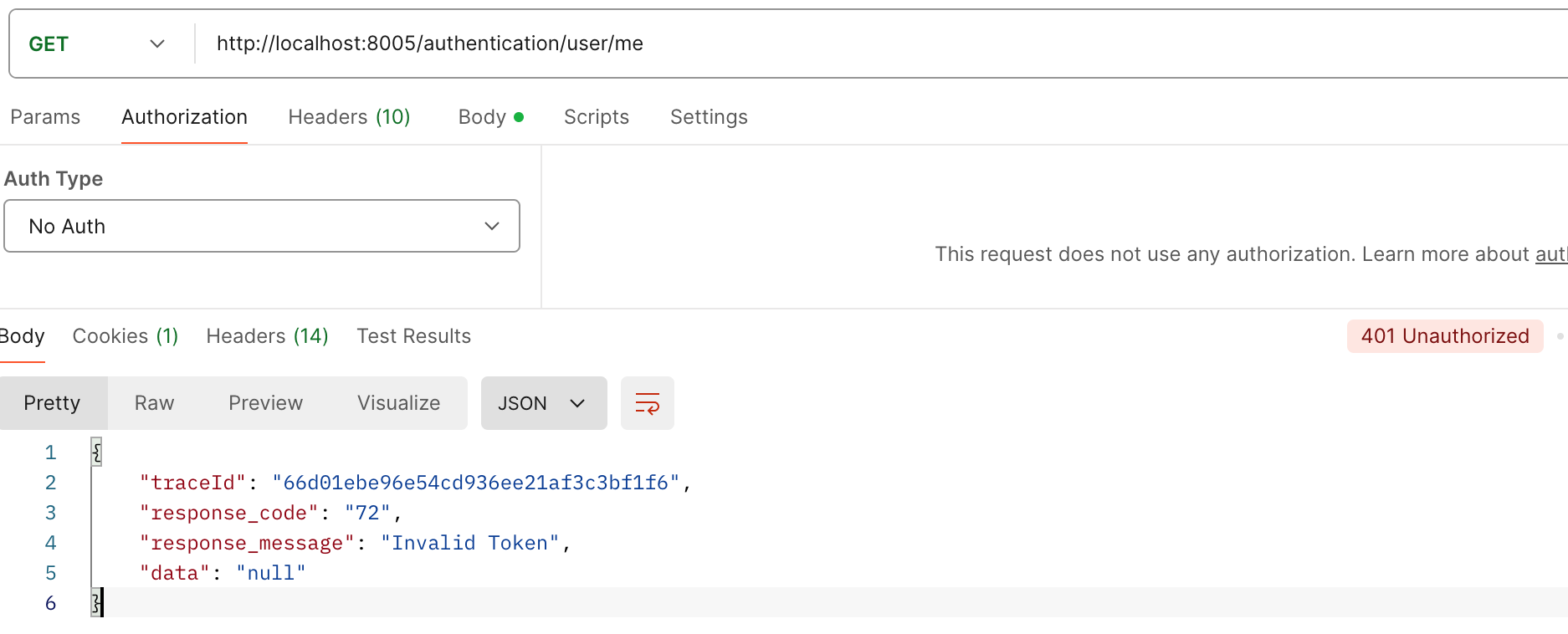
Entry Point Exception Handler
Create entry point exception handler to catch exception when request not authenticate.
Create JwtAuthenticationEntryPoint inside /exception folder.
@Component
public class JwtAuthenticationEntryPoint extends BasicAuthenticationEntryPoint {
  @Override
  public void commence(HttpServletRequest request, HttpServletResponse response, AuthenticationException authException) throws IOException {
    response.setStatus(HttpServletResponse.SC_UNAUTHORIZED);
    response.setContentType("application/json");
    String payload = "{ \"traceId\": \"" + MDC.get(TRACE_ID) + "\", \"response_code\": \"" + ERROR_CODE_DECLINE + "\", \"response_message\": \"" + ERROR_DESCRIPTION_TOKEN_INVALID + "\", \"data\": \"" + null + "\" }";
    response.getWriter().write(payload);
  }

  @Override
  public void afterPropertiesSet() {
    setRealmName("JWT Authentication");
    super.afterPropertiesSet();
  }
}
Config Web Security
We want to make criteria filter, /auth/* doesn't require authentication token. So other URL must be authenticated.
Create SecurityConfig inside /config folder.
@Slf4j
@Configuration
@EnableWebSecurity
@RequiredArgsConstructor
public class SecurityConfig {
  private final AuthenticationProvider authenticationProvider;
  private final AuthenticationFilter authenticationFilter;
  private final JwtAuthenticationEntryPoint jwtAuthenticationEntryPoint;

  private static final String[] AUTH_WHITELIST = {
    "/auth/*",
    "*/auth/*"
  };

  @Bean
  public MvcRequestMatcher.Builder mvc(HandlerMappingIntrospector introspector) {
    return new MvcRequestMatcher.Builder(introspector);
  }

  @Bean
  public SecurityFilterChain securityFilterChain(HttpSecurity http) throws Exception {
    http
      .csrf(AbstractHttpConfigurer::disable)
      .sessionManagement(session -> session.sessionCreationPolicy(SessionCreationPolicy.STATELESS))
      .exceptionHandling((exception) -> exception.authenticationEntryPoint(jwtAuthenticationEntryPoint))
      .authorizeHttpRequests(
        authorizationManagerRequestMatcherRegistry ->
          authorizationManagerRequestMatcherRegistry
            .requestMatchers(AUTH_WHITELIST).permitAll()
            .anyRequest().authenticated())

      .authenticationProvider(authenticationProvider)
      .addFilterBefore(authenticationFilter, UsernamePasswordAuthenticationFilter.class);

    return http.build();
  }
}
Unit Test
When I create unit test RefreshTokenHelper, im using @ExtendWith(SpringExtension.class)
Then since im using @ExtendWith(SpringExtension.class) not @SpringBootTest, i have to avoid ReflectionTestUtils to mock my properties when i use @Value
Key point:
- check_circle Im only loading RefreshTokenHelper in the Spring context, not the full application context.
- check_circle Spring sees the @Value("${jwt.expiration}") on your field, but there’s no property source defined. So it tries to inject a String (probably empty) into a long → fails.
- check_circle @BeforeEach runs after the context is created, so ReflectionTestUtils.setField is too late.
Fixes:
@ExtendWith(SpringExtension.class)
@ContextConfiguration(classes = RefreshTokenHelper.class)
@TestPropertySource(properties = "jwt.expiration=300")
public class RefreshTokenHelperTest {
  @Autowired
  private RefreshTokenHelper refreshTokenHelper;

  @Test
  void testSomething() {
    // your test logic
  }
}
Notes:
- check_circle Do NOT rely on ReflectionTestUtils.setField for config values that are injected via @Value - it's too late
- check_circle Either provide a property source or inject via constructor/bean definition.
Testing
Run application with command mvn spring-boo:run
Open Postman, hit endpoint register /auth/sign-up with request body user information.
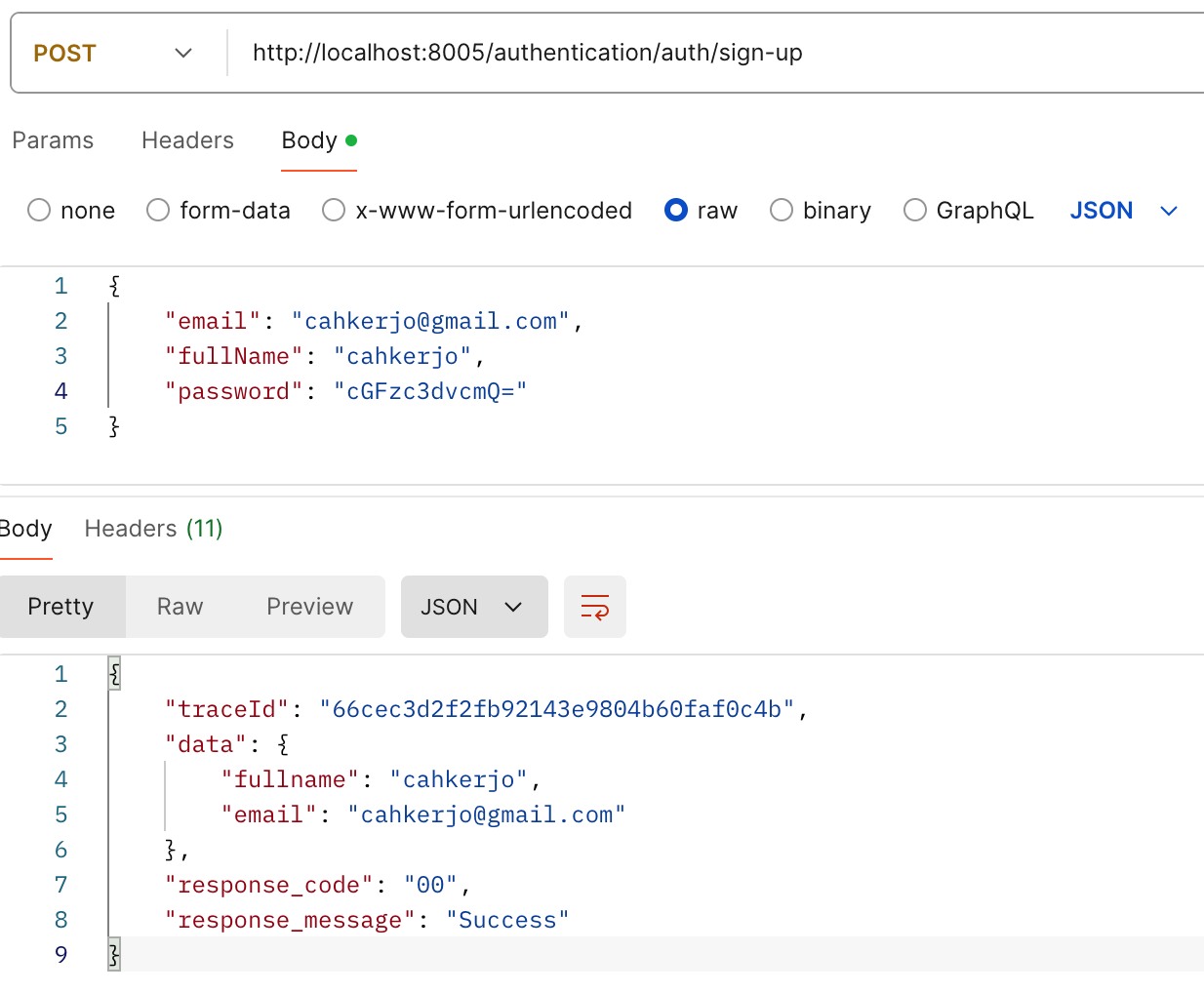
Now let's try authenticate user we registered. Send POST to /auth/login with request body email and password encrypted.
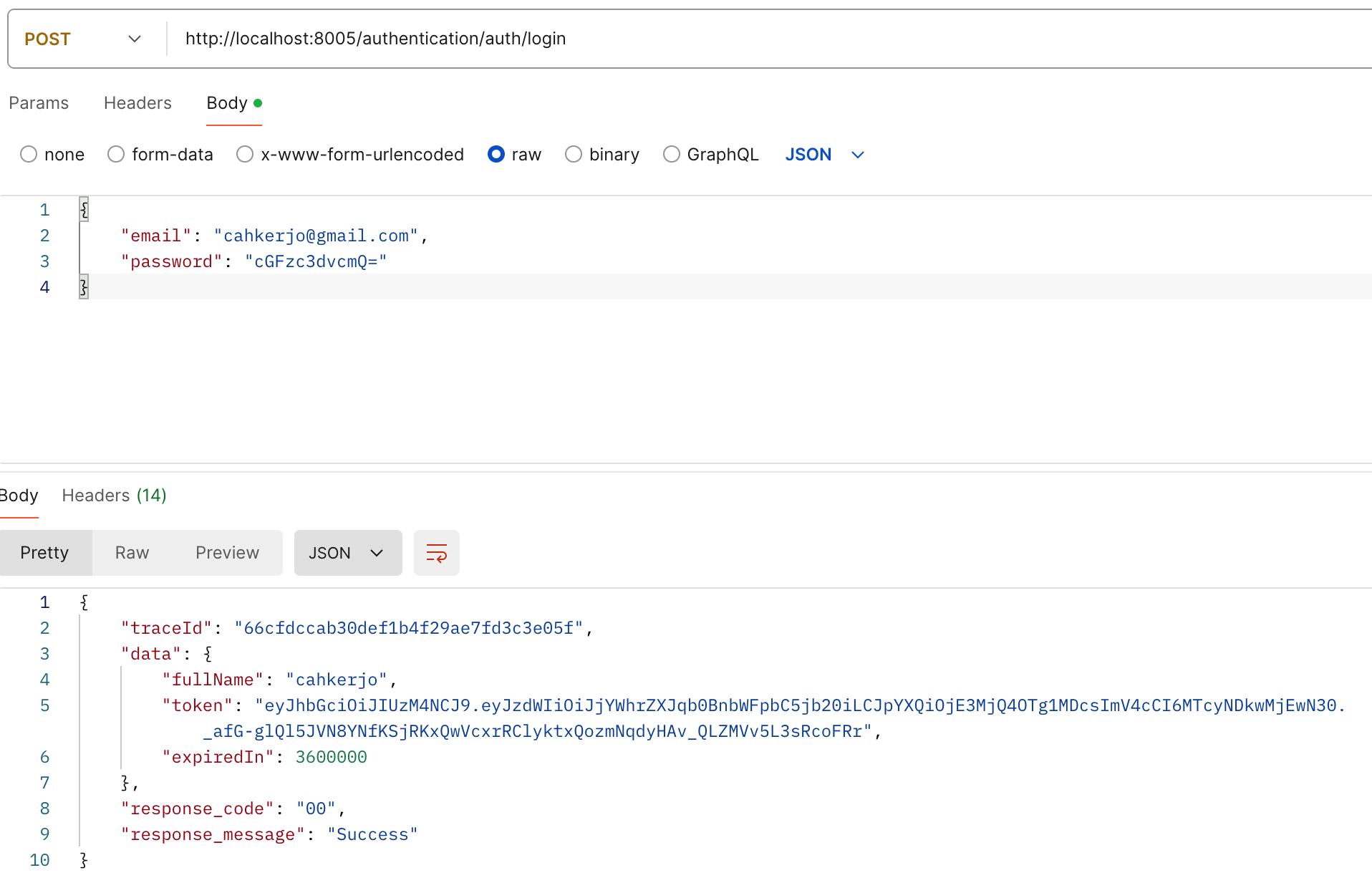
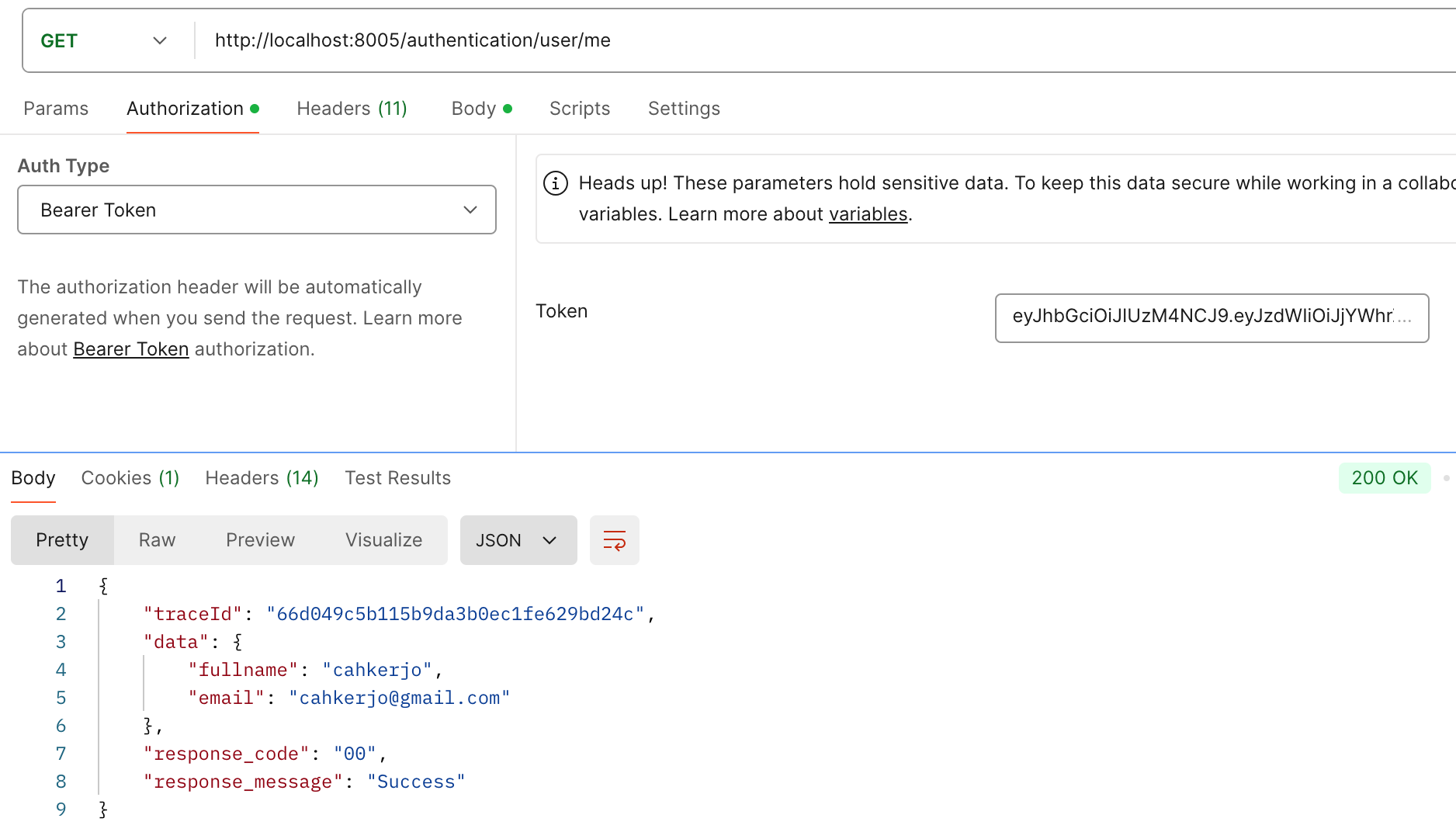
Then access private endpoint. Send GET to /user/me with header authorization token from response login.
And if we try to access private endpoint without token, we will get response status http 401 as we write entry point exception handler before.
You can find complete source code here: Gitlab Repository


